
10 Tips for Choosing Corporate Office Desks
Choosing corporate office desks is more complicated than matching a finish to your brand colors. A desk affects posture, movement, privacy, collaboration, and daily concentration. It also shapes how people use limited floor space. A polished showroom model may look impressive, yet feel uncomfortable after six hours of video calls.
Jim Keane, former CEO of Steelcase and a recognized workplace strategist, once said, “The office is not a place. It’s a tool.” That idea matters when comparing corporate office desks. The right desk should support real work, not merely complete an attractive interior plan. Consider monitor depth, cable access, legroom, height adjustment, cleaning routines, and the needs of employees with different body sizes. Small details matter. A sharp desk edge can become irritating. A narrow surface can force a laptop beside important documents.
This guide presents ten practical tips for making a more informed decision. It considers durability, ergonomics, layout flexibility, material quality, sustainability, and long-term cost. It also addresses purchasing mistakes that are easy to overlook, such as choosing fixed dimensions for a changing team. No desk solves every workplace problem. That is worth remembering. A beautiful desk cannot repair poor lighting, excessive noise, or unclear working policies. Still, a carefully selected desk can reduce daily friction and create a more dependable working environment. Before approving a large order, test sample desks with real users, real equipment, and realistic tasks. Their feedback may challenge the original plan, which is often useful.
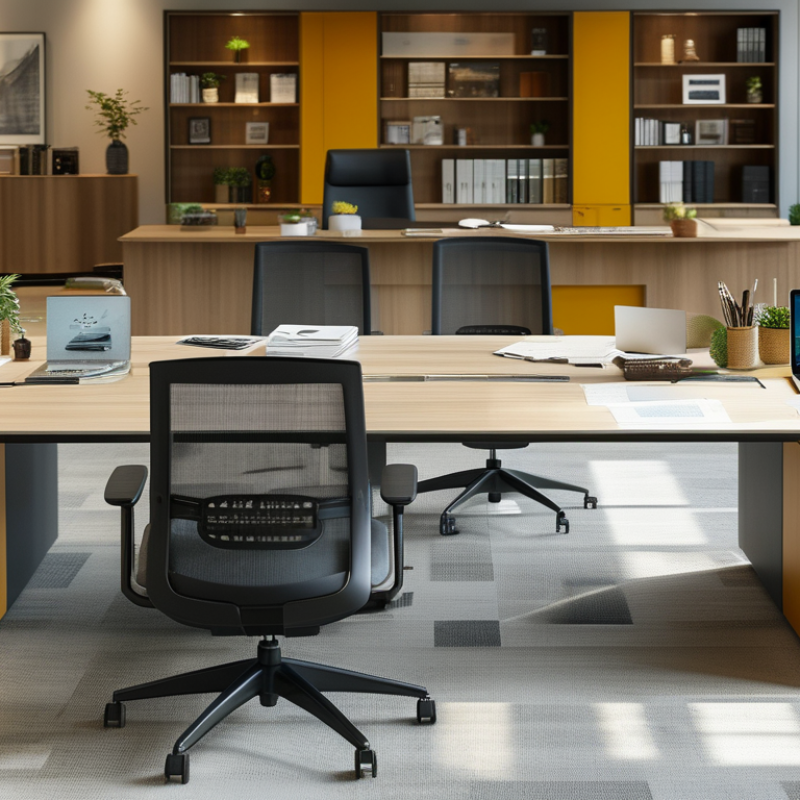
Define Workplace Requirements and Desk Functions
Define Workplace Requirements and Desk Functions
Choosing office desks should begin with work, not room dimensions. Map each role’s daily tasks: focused writing, video calls, shared projects, or document handling. A finance employee may need two monitors and secure storage. A creative team may need wider surfaces and quick collaboration. Desk function must follow real behavior.
Gallup’s State of the Global Workplace 2024 reports that only 23% of employees are engaged worldwide. It also records daily stress among 41% of employees. Desk design cannot solve workplace culture, but poor layouts can add friction. Specify adjustable height, adequate legroom, glare control, cable access, and acoustic separation. These details support concentration and physical comfort.
Measure before ordering. Record monitor depth, chair movement, circulation paths, and storage needs. The International Ergonomics Association recommends designing around varied users, rather than an average body. That principle matters. A fixed desk height may suit one employee and strain another. In practice, teams often overestimate meeting needs and underestimate quiet work. That mistake wastes space. Pilot several desk types for two weeks, then collect employee feedback and observe actual use. Early assumptions may be wrong. The final schedule should allow focused desks, collaborative surfaces, and occasional touchdown areas without forcing every employee into one identical setup.
| No. | Workplace Requirement | Desk Function | Recommended Specification | Useful Data Point | Selection Check |
|---|---|---|---|---|---|
| 1 | Match the desk to the employee’s primary work pattern. | Individual computer work, writing, document review, or mixed daily activities. | Choose a work surface of approximately 120–160 cm wide × 70–80 cm deep for a standard individual workstation. | A deeper surface provides more room for a monitor, keyboard, documents, and task materials without placing equipment at the edge. | Place the intended equipment on a sample desk and confirm that frequently used items remain within easy reach. |
| 2 | Support comfortable seated posture. | Provide a stable working height for routine desk-based tasks. | Use a fixed height of about 72–75 cm, or select a height-adjustable model with a broad adjustment range. | Desk height should work with the chair so that shoulders remain relaxed and elbows can stay close to the body. | Test the desk with the actual office chair; verify that the user can sit upright without raising the shoulders. |
| 3 | Accommodate monitor and technology requirements. | Support one or more monitors, docking equipment, keyboards, and other peripherals. | Allow sufficient depth for the monitor to be positioned roughly 50–100 cm from the user, depending on screen size and visual comfort. | Monitor placement should allow a generally forward-facing posture and minimize repeated neck and trunk rotation. | Measure the monitor footprint, stand depth, cable route, and available rear clearance before ordering. |
| 4 | Enable movement during the workday. | Alternate between seated and standing tasks where the role and policy require it. | Consider an electric sit-stand desk with a usable range of approximately 65–125 cm, subject to user height and equipment load. | Height-adjustable desks can support posture changes, but they do not replace regular movement breaks or ergonomic training. | Check adjustment speed, stability at maximum height, noise level, control access, and anti-collision protection. |
| 5 | Protect privacy for focused or sensitive work. | Reduce visual exposure for confidential calls, financial work, customer records, or concentration-heavy tasks. | Use a layout with suitable desk orientation, modest privacy screens, or enclosed work zones rather than relying only on tall barriers. | Privacy requirements depend on the task, information sensitivity, acoustic conditions, and circulation paths. | Review sightlines from doors, corridors, visitor seating, and shared spaces before finalizing the desk arrangement. |
| 6 | Support collaboration without sacrificing individual work. | Enable quick discussions, shared project work, and team interaction. | Combine individual desks with small meeting surfaces or modular configurations; maintain clear routes of at least 90 cm where accessibility and local codes require it. | Collaborative areas work best when they are close enough for access but do not block primary circulation or focused workstations. | Map walking routes, chair pull-out space, meeting positions, and emergency egress before approving the layout. |
| 7 | Plan for power, data, and cable management. | Connect computers, displays, chargers, telephones, and shared devices safely and neatly. | Select desks with cable trays, rear access, power-module compatibility, and adequate clearance for floor or under-desk connections. | Separating power and data pathways where appropriate can simplify maintenance and reduce cable clutter. | Count outlets and data points for each workstation, including spare capacity for future equipment. |
| 8 | Meet accessibility and inclusive-use requirements. | Allow employees with different body sizes, mobility needs, and work methods to use the workstation effectively. | Provide clear knee and leg space, adjustable components where possible, and a workstation position that can be approached without obstruction. | Accessible design should be checked against applicable local regulations and the specific needs of the workforce. | Confirm turning space, approach direction, clearance, control reach, and compatibility with mobility equipment. |
| 9 | Choose materials suitable for the operating environment. | Withstand daily use, cleaning, relocation, and the expected level of wear. | Specify a stable frame, durable worktop, sealed edges, replaceable components, and surfaces compatible with approved cleaning products. | Durability depends on construction quality, load rating, moisture exposure, cleaning practices, and frequency of reconfiguration. | Inspect edge quality, frame rigidity, fasteners, surface finish, warranty terms, and replacement-part availability. |
| 10 | Plan for change, growth, and hybrid work. | Support team expansion, desk sharing, departmental moves, and changing technology needs. | Prefer modular desks with standardized dimensions, removable screens, reversible layouts, and easy reconfiguration. | Flexible furniture can reduce disruption when headcount, working patterns, or equipment requirements change. | Record desk dimensions, component compatibility, storage needs, relocation effort, and the percentage of spare capacity required. |
Related Posts
-

How to Choose the Perfect Office Work Desk for Your Productive Workspace
-
Premium Manufacturing Excellence from China for the Best Desk and Chair Solutions
-

Trends in the Global Business Desk Market for 2025 Insights and Projections
-
Trustworthy Quality Office Desks and Chairs Made in China for Global Use
-
Ultimate Guide to Sourcing High-Quality Office Furniture Chairs for Your Business Needs
-
2026 Top Office Table Chairs for Global Buyers to Consider?