
Largest Selection of New and Used Office Furniture! Call 1-855-885-3375 or visit a showroom today!
Choosing a High Backed Office Chair is about more than selecting a tall backrest. The right chair should fit your body, desk, and working habits. Look closely at lumbar support, seat depth, armrest adjustment, recline, and breathable materials. Small details matter. A firm edge pressing behind your knees can feel uncomfortable by lunchtime.
The World Health Organization’s 2022 report estimates that 1.71 billion people worldwide live with musculoskeletal conditions. This figure covers many causes; it does not mean a chair alone can prevent pain. Still, it shows why everyday comfort deserves careful attention. OSHA’s Computer Workstations eTool recommends a chair that supports the back and allows users to keep their feet supported. Those practical checks offer a better starting point than choosing by appearance or padding thickness.
Ergonomist Alan Hedge is often quoted as saying, “The best posture is the next posture.” The reminder is useful: even a well-adjusted chair cannot replace regular movement. Consider how long you sit, whether you recline during calls, and if the chair’s headrest supports you without pushing your chin forward. Try the controls in person when possible. A chair may look impressive online and still feel wrong after an hour. There is no perfect model for everyone. This guide explores the features, fit, and trade-offs that help you choose a High Backed Office Chair with realistic expectations.
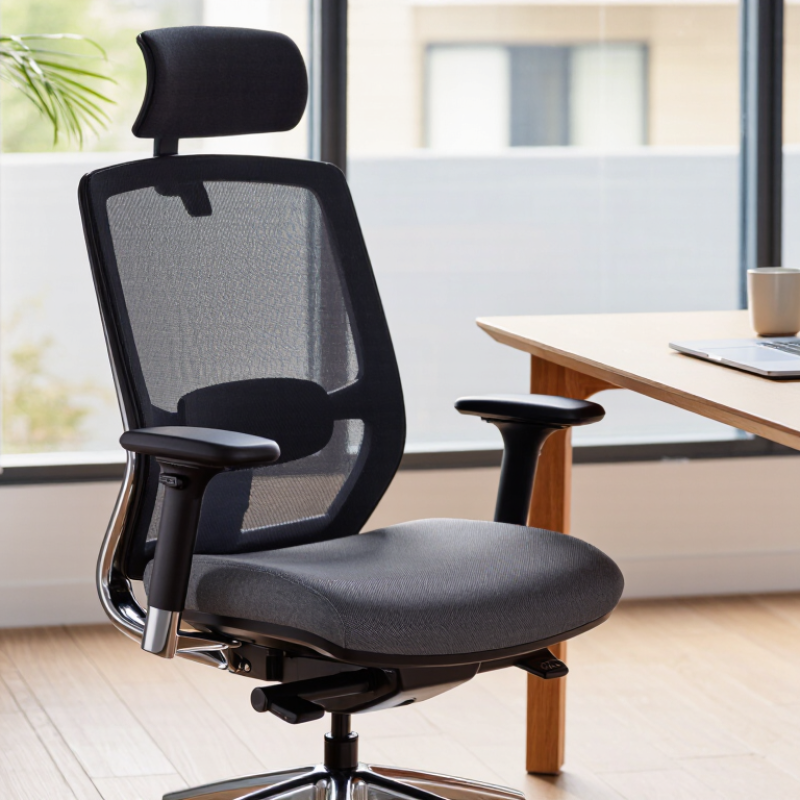
How to Choose the Best High Backed Office Chair?
Define ergonomic requirements using ISO 9241-5 workstation guidance
ISO 9241-5 focuses on workstation design, including posture, reach, and the relationship between equipment and the person using it. It does not prescribe one ideal chair for everyone. Look for a high-backed chair with adjustable seat height, seat depth, and backrest support. When seated, keep your feet supported and your shoulders relaxed. Your lower back should meet the backrest without forcing you into a rigid pose. Small details matter, like whether the chair edge presses behind your knees.
Tips: Adjust the chair to your body, then position the desk, keyboard, and screen around that posture. Keep frequently used items within easy reach. If your feet do not rest comfortably on the floor, consider a footrest. Try the adjustments for several minutes, not just a quick showroom sit. Fit matters.
A chair cannot compensate for a workstation that encourages constant reaching or a fixed posture. Allow room to change position, and take short movement breaks during long tasks. I would also reassess the setup after a week; an adjustment that feels right at first may not stay comfortable. That is easy to overlook. Use discomfort as a cue to review the chair and workstation together, rather than assuming a taller backrest will solve everything.
A high back matters, but a good fit starts with the seat. Measure the user’s seated height and lower-leg length while wearing typical work shoes. Adjust the chair so both feet rest flat, with knees level with or slightly below the hips. The seat should not press into the backs of the knees. Even a small mismatch can cause shifting during a long work session.
Tips: Sit back against the backrest. Leave about two or three fingers between the seat edge and the knees. If your feet dangle, try a footrest before raising the seat too far. Check the fit again after changing shoes.
Seat depth should support most of the thighs without restricting circulation or movement. Users with shorter legs often need a shallower seat or an adjustable seat pan; taller users may need more support. Test the chair for several minutes, not just a quick sit. Notice pressure behind the knees and whether your lower back stays supported. Measurements help, but bodies differ, and one “ideal” setting may not feel right all day. That part is easy to overlook.
A high back can look substantial, but appearance does not prove durability. Check whether the chair was evaluated against the current ANSI/BIFMA X5.1 requirements for general-purpose office chairs. These tests examine areas such as structural strength, stability, and repeated-use wear. They help reveal weaknesses a quick showroom sit may miss.
Ask for a test report, not just a claim on a product page. It should identify the chair model, tested configuration, standard edition, and testing organization. Small details matter: a report for a chair with different arms or a different base may not fully represent the one you are considering. Look for documented results, including any failures and retests. A vague “tested to standard” statement is less useful.
Durability is not comfort. Keep those separate. A chair may meet applicable test requirements and still feel wrong after a long workday. Check that the back supports your shoulders, the seat fits your legs, and adjustments hold without slipping. In person, I would raise and lower the backrest, then lean back several times and listen for looseness or creaking. Not a lab test, of course. Still, it can expose concerns worth asking about. The standard helps compare evidence; it cannot predict how well a particular chair fits your body or workspace.
How to Choose the Best High Backed Office Chair?
Compare capacity: X5.1 covers 275 lb; X5.11 covers 400 lb
Capacity is a practical starting point when comparing high-backed office chairs. The X5.1 is rated for up to 275 lb, while the X5.11 is rated for up to 400 lb. Choose a model whose stated limit comfortably covers the intended user’s weight. Do not treat the rating as a measure of seat width, comfort, or long-term durability.
That distinction matters. A chair can meet a weight limit yet still feel cramped or poorly fitted. Check the seat dimensions, back height, and adjustment range alongside the capacity. If possible, sit in the chair and test whether your feet rest flat and your lower back feels supported. Small fit issues become noticeable during a full workday.
It is easy to overfocus on the larger number. Not always. The 400 lb rating may suit users who need more capacity, but it does not automatically make that chair the better choice for everyone. Confirm the rating and specifications in the product documentation, and consider the actual user and workspace. I would pause before choosing based on capacity alone; it is an important limit, not a complete comfort assessment.
When comparing high-backed office chairs, check whether the lumbar support meets your lower back rather than pressing into it. Its position should feel noticeable but not sharp. Sit with your feet flat and spend several minutes at your usual desk height; a quick showroom test can miss pressure that builds over time. A tall back is not automatically a supportive one.
Test the recline with your hands on the desk, then lean back slowly. The movement should feel controlled, without a sudden drop or a stiff push against your shoulders. If the chair has tension adjustment, check whether you can tune it to your body weight. Small detail, big difference. A recline lock can help during focused work, but you may not need the same setting all day.
Armrests should move to support your forearms while your shoulders stay relaxed. Try raising, lowering, and shifting them inward or outward; check that they do not collide with the desk when you roll close. If your elbows flare or your shoulders lift, the fit is off. It is tempting to judge a chair by its feature list, but adjustment range matters only when those settings suit your body. Even careful testing has limits: comfort can change after a full workday.